Run your hourly team without the group texts.
Ponchi puts the schedule, the time clock, and payroll-ready hours in one app your whole team will actually use. Set up in minutes, on the phone and the web.

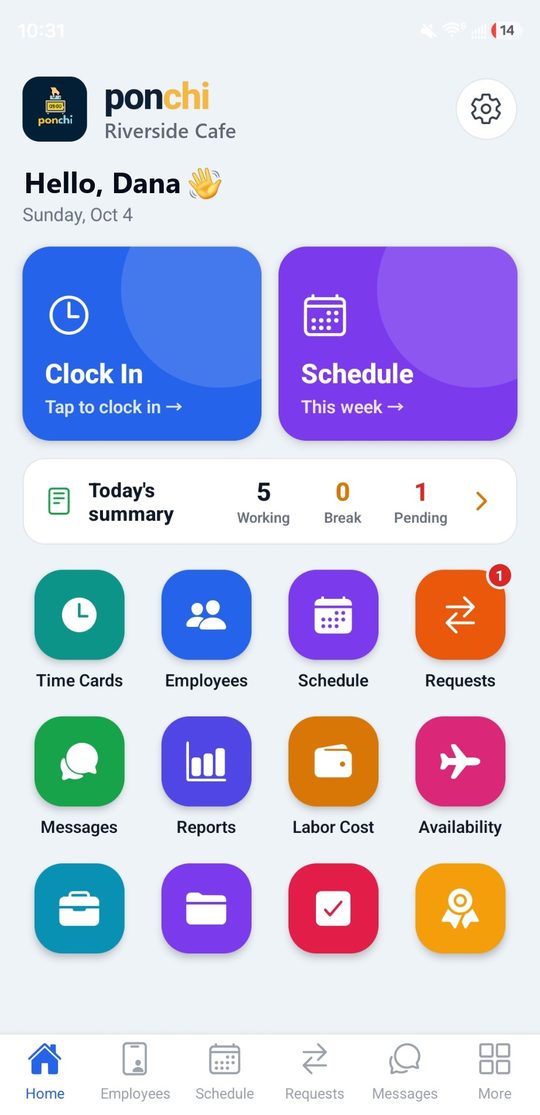
Everything your team needs, in one app
From building next week's schedule to exporting hours for payroll — without a spreadsheet in sight.
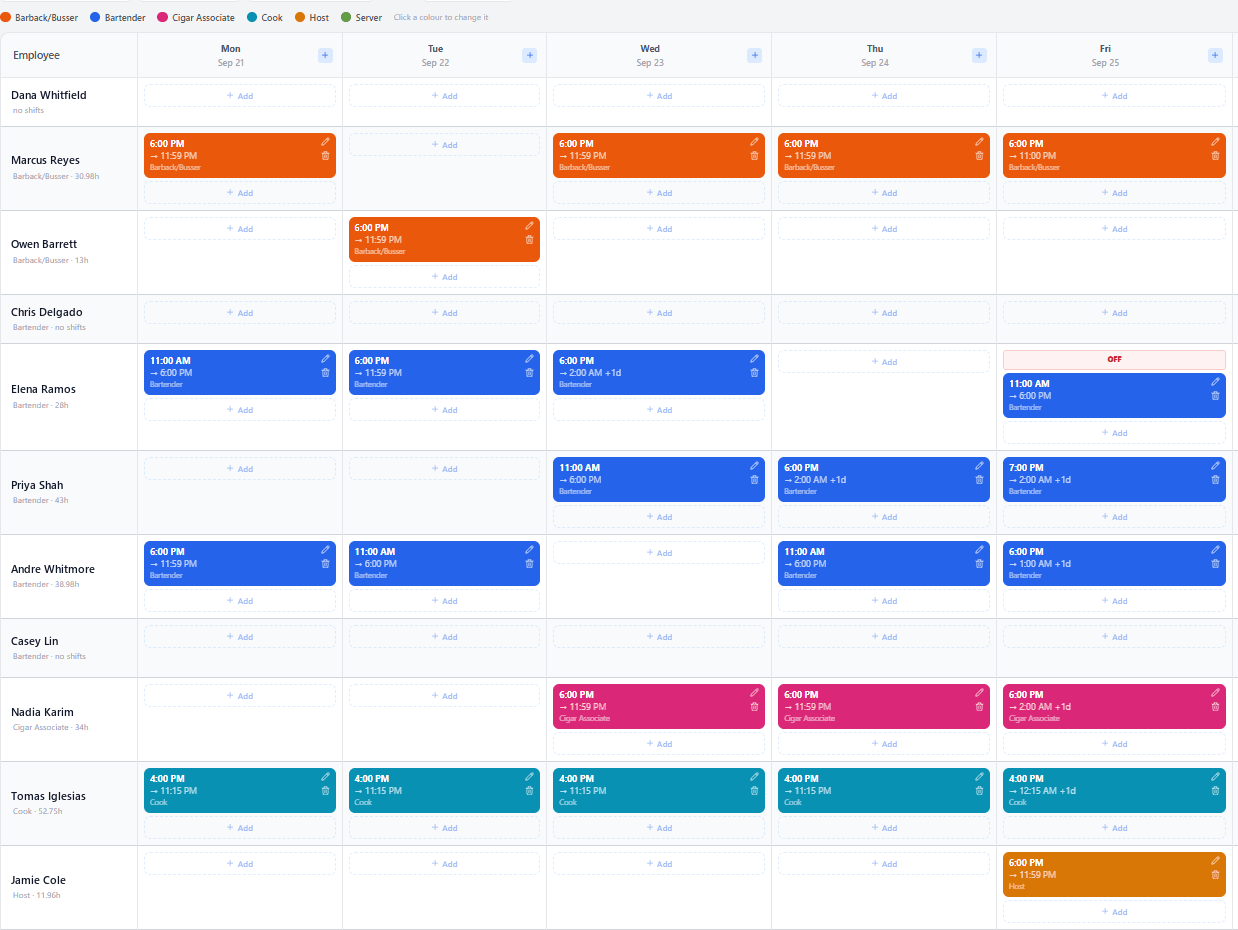
Build next week in minutes, not evenings
Copy last week, fix the shifts that changed, publish once. Everyone gets a single notification with their shifts.
- Every position has its own colour, so the week reads at a glance
- Drafts stay private until you press Save & Publish
- Warns you before scheduling someone on an approved day off
- Night shifts that end at 2 AM stay one shift, on the right day
- Post open shifts your team can claim
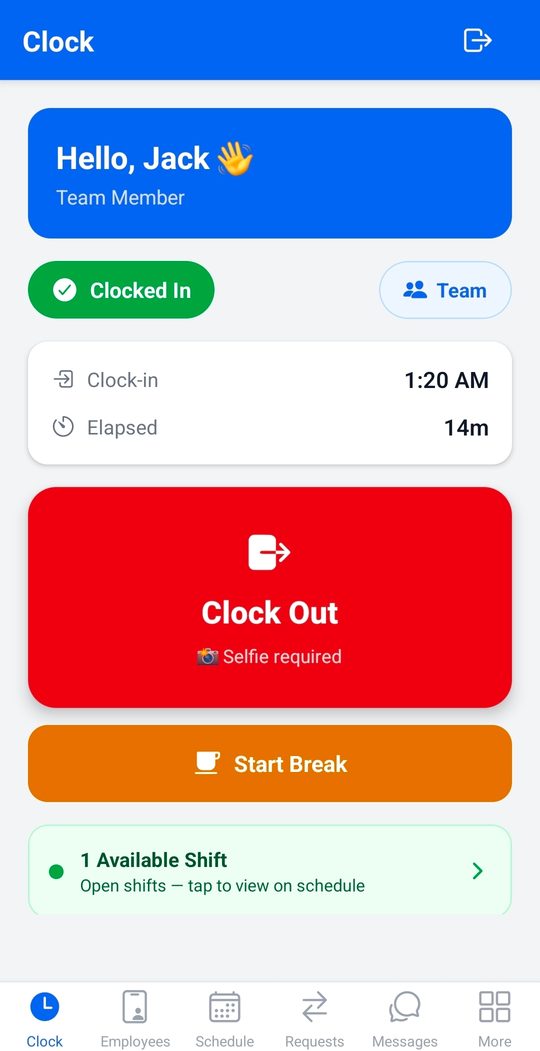
Clock-ins you can actually trust
Staff clock in from their own phone, or from one shared tablet at the counter. You choose how each punch is verified.
- Selfie on clock-in and clock-out, so it is really them
- A geofence per location, with the radius you set
- Kiosk mode turns one tablet into a shared clock
- Break tracking, and an alert when someone has not clocked in
- Location is only checked at the punch, never in the background
- A shift checklist to tick off and sign before clocking out
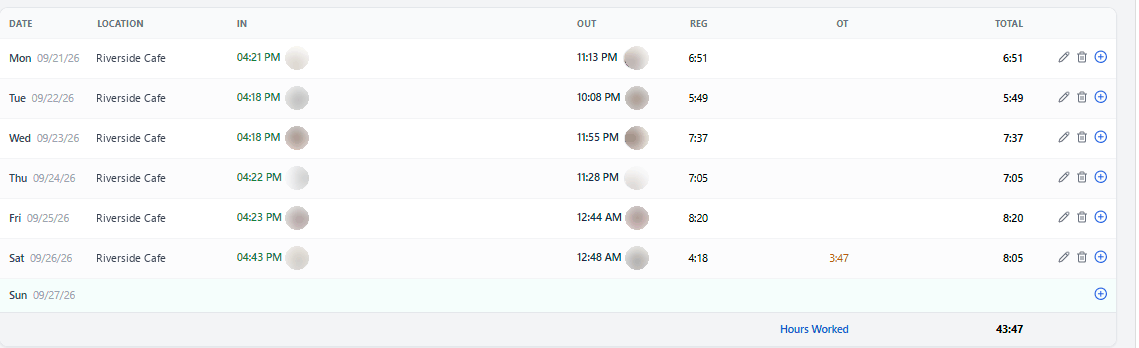
From punches to payroll, without the spreadsheet
Every clock-in lands on a time card you can read, fix, and export. Hours add themselves up.
- A time card per person: days, breaks, regular and overtime
- Selfies attached to each punch, right on the card
- Hours split by location for multi-site teams
- Fix a missed punch in seconds — every edit is logged
- Export payroll-ready Excel for hours, overtime and attendance
Keep everyone in the loop
Requests, messages and recognition live in the same app as the schedule, so nothing gets lost in a group chat.
- Time off, swaps and give-aways — approve, hand to someone, or cancel in one tap
- Announcements to everyone, or to a single location
- Shout-outs and anonymous feedback
- Onboarding checklists and documents for new hires
- Each person picks English or Español for their own app
The details other apps get wrong
Ponchi is built with real bars, restaurants and shops — so the awkward parts of shift work actually work.
Overnight shifts, done right
A 6 PM to 2 AM shift is one shift, on the day it starts. One reminder, one row, and the hours counted across midnight.
Draft now, publish when ready
Move shifts around all week without anyone seeing. One click publishes, and each person gets a single notification.
Days off that stick
Approved time off is marked on the schedule, and Ponchi stops you before you book someone on their day off.
The whole operation, from a phone
Managers approve, review and report from anywhere. Staff only ever see the two buttons they need.
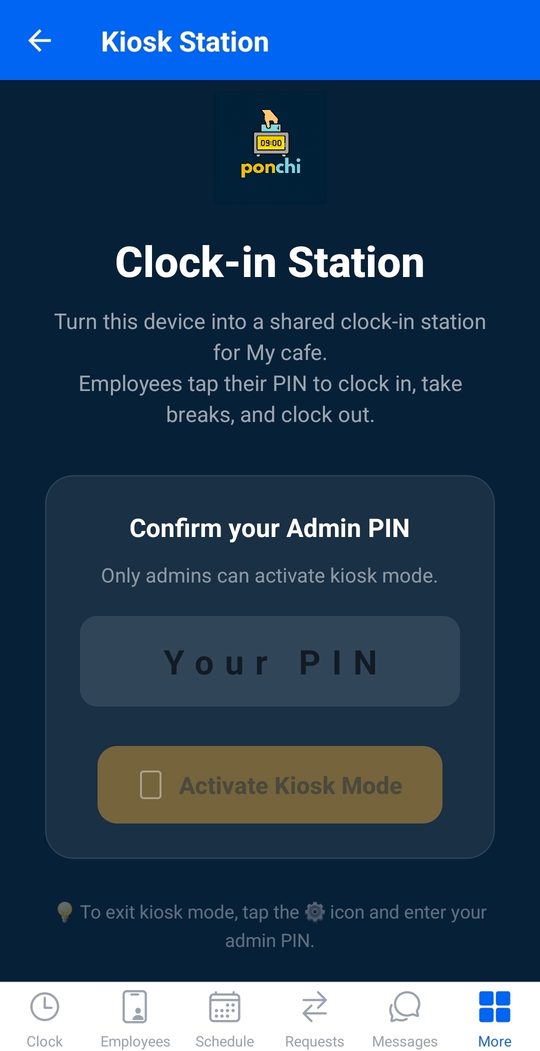
Kiosk mode
One tablet at the counter. Staff tap their name and a PIN — in and out in two seconds.
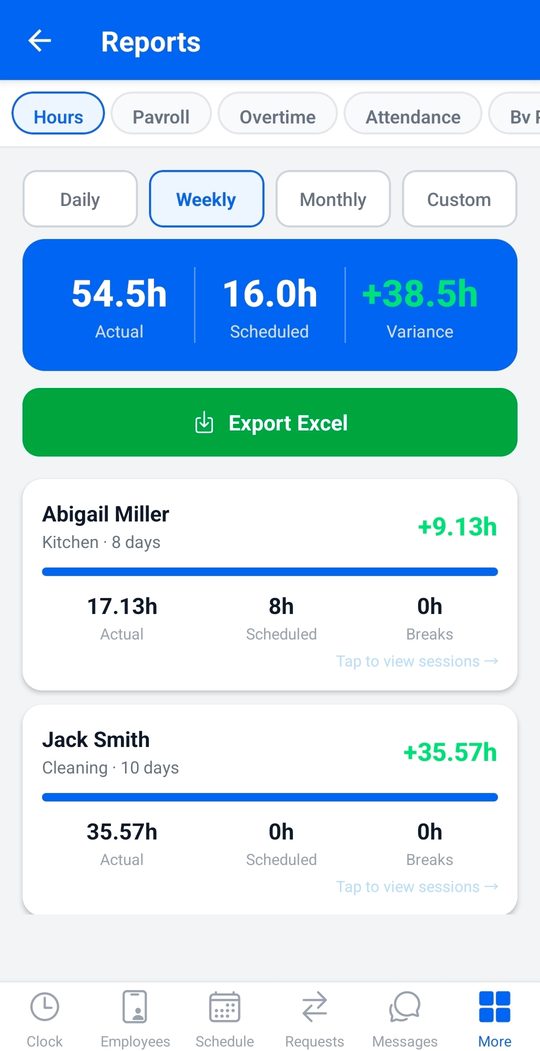
Reports that export
Hours, overtime, attendance and pay — on screen, and out to Excel whenever payroll is due.
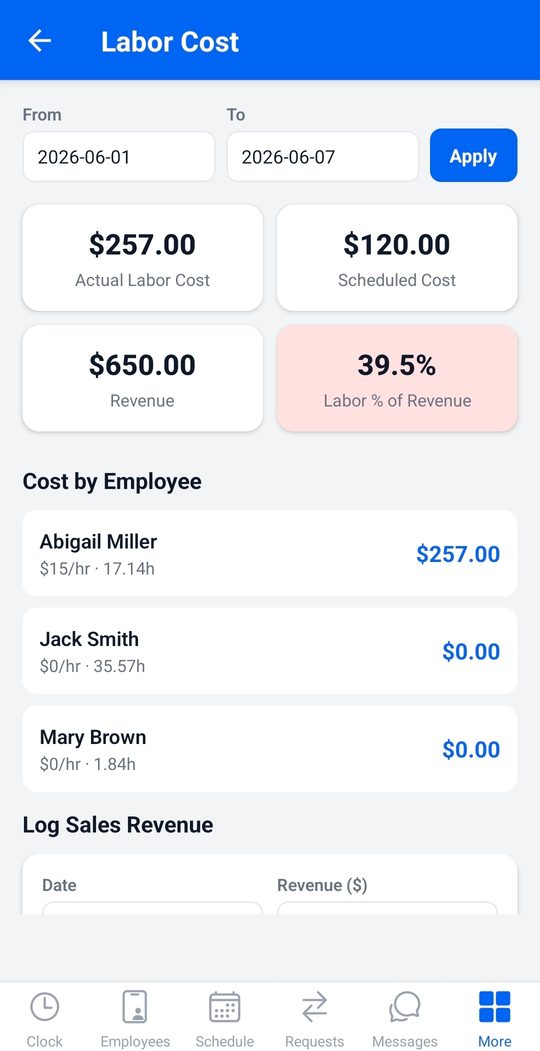
Live labor cost
Watch labor against revenue while the shift is running, per employee and per location.
Everything you need to manage hourly teams
Powerful where it counts, simple enough that your team actually uses it.
Shift checklists
Opening, closing and cleaning lists for each position and shift. Staff tick them off on their phone, record temperatures, log the hourly checks and sign before they clock out. You see who signed, what was skipped and why.
GPS & geofenced clock-in
Confirm staff are on-site the moment they clock in, with the radius you choose per location.
Photo verification
An optional selfie on clock-in and clock-out confirms who is punching and ends buddy punching.
Shift scheduling
Colour-coded by position, copy last week in one click, edit any shift in place, post open shifts.
Time cards
A clean card per employee with days, breaks, regular and overtime hours — and the selfies attached.
Payroll-ready exports
Turn tracked hours into clean Excel files for hours, overtime, attendance and pay.
Real-time labor cost
See labor cost against revenue as it happens, broken down by employee and location.
Kiosk mode
Turn one tablet into a shared clock-in station — staff tap a PIN to punch in and out.
Multiple locations
Each site gets its own geofence, schedule, rules and staff. Filter every page by location.
Requests, sorted out
Days off, availability, swaps and give-aways in one inbox with Pending, Approved, Picked up and Denied tabs. Every card says who decided. A given-away shift stays the giver's until it is taken, and you can hand it to anyone directly.
Messaging & recognition
Chats, announcements and shout-outs — sent to everyone or to a single location.
Hiring & onboarding
Job postings, onboarding checklists and documents, all attached to the employee record.
English & Español
Every screen, both languages. Each employee chooses their own, and yours stays as it is.
Any business with hourly or on-site staff
Up and running this afternoon
Create your company
Sign up, add your locations and your team. You get a company ID; everyone signs in with a username and PIN.
Choose how they clock in
Selfie, GPS geofence, or both. Set the radius per location and you are done.
Publish the schedule
Build the week, press publish, and watch clean, payroll-ready hours roll in.
What could Ponchi save you?
Time theft, rounding and buddy punching add up quietly. Move the sliders for a rough estimate.
Estimate only, for illustration. Based on recovering about 4% of payroll commonly lost to time theft, rounding and buddy punching. Actual results vary.
Simple plans that grow with you
Every plan includes all features. You only choose your team size.
Starter
- GPS & photo clock-in
- Scheduling, swaps & time off
- Time cards & payroll exports
- Messaging & recognition
- Hiring, onboarding & compliance
- English & Español
Growth
- GPS & photo clock-in
- Scheduling, swaps & time off
- Time cards & payroll exports
- Messaging & recognition
- Hiring, onboarding & compliance
- English & Español
Pro
- GPS & photo clock-in
- Scheduling, swaps & time off
- Time cards & payroll exports
- Messaging & recognition
- Hiring, onboarding & compliance
- English & Español
All plans start with a free 14-day trial · No credit card to start · Cancel anytime
Made for busy teams
“Payroll used to take me a whole evening. Now I export the hours in one tap, and my staff love how fast clocking in is.”
“GPS clock-in changed everything on our job sites. I finally know everyone is actually there when they punch in.”
“Scheduling and swaps used to be chaos over text. Now it is all in Ponchi and everyone knows their shifts.”
We are celebrating our launch by giving five businesses a full year of Ponchi — completely free. Start your subscription during the promotion and you are entered automatically. Already paying? You are in too.
No purchase necessary to enter or win. A free alternate method of entry is available (see official rules). A purchase will not improve your chances of winning.
Official rules & eligibility
NO PURCHASE NECESSARY. A purchase will not increase your chances of winning. Open to legally registered businesses in the 50 United States and D.C. where the owner/authorized representative is 18 or older. Void where prohibited.
Promotion Period: as announced on this page. Entry: (1) start a paid Ponchi subscription during the Promotion Period, OR (2) free alternate entry — email hello@ponchi.app with your business name and contact during the Promotion Period. Limit one entry per business.
Prize: five (5) winners each receive twelve (12) months of a Ponchi subscription at no charge (approx. retail value up to $419.88 each). Winners selected in a random drawing after the Promotion Period and notified by email; if a winner is a paid subscriber, their account is credited; non-subscribers receive a 12-month complimentary subscription.
Sponsor: Optima Buildsolutions LLC. This promotion is not sponsored, endorsed, or administered by, or associated with, Google or Apple. By entering, participants agree to these rules. Taxes (if any) are the responsibility of winners. For a full copy of the rules or winners list, email hello@ponchi.app.
Get the Ponchi User Guide
A step-by-step PDF for managers and employees: setup, locations, clock-in, the schedule builder, drafts and publishing, requests and reports. Updated October 2026.
Watch the 30-second tour
Questions, answered
What exactly is Ponchi?
Ponchi is a time clock and scheduling app for small businesses with hourly staff. Your team clocks in from their phone or a shared tablet, you build and publish the schedule, and the hours come out payroll-ready. It works on iPhone, Android and the web, in English and Spanish.
How does the free trial work?
Every plan starts with a free 14-day trial and no credit card. You can manage or cancel at any time from your account at app.ponchi.app.
Is my team tracked all day?
No. Location is only checked at the moment of clock-in and clock-out, to confirm the punch. Ponchi never follows anyone in the background, and the app says so plainly to your staff.
Can I work on next week without my team seeing it?
Yes. New shifts are saved as drafts only managers can see. When you press Save & Publish, everyone gets one notification with their shifts for the week.
What about shifts that end after midnight?
Enter them as one shift, for example 6 PM to 2 AM. It stays on the day it starts, counts the right hours, and sends a single reminder.
Does it handle more than one location?
Yes. On the Growth and Pro plans each location has its own geofence, schedule and rules. Staff can work at more than one site, and hours are reported per location.
Do I need special hardware?
No. Your team uses their own phones, or you can set up any spare tablet as a shared kiosk with PIN clock-in. There is nothing to install on a computer — the web app runs in the browser.
Can I use it in Spanish?
Yes, fully. Every screen exists in English and Español, and each employee picks their own language without changing yours.
What happens when someone gives a shift away?
The shift stays theirs, and their responsibility, until a coworker takes it and a manager approves. Coworkers who want it appear on the request; the manager can approve one, hand the shift to anyone directly, or cancel the shift. If nobody takes it before the day comes, it simply stays on the original schedule.
Can my team follow a checklist for each shift?
Yes. Build a list per position and shift, such as opening the bar or closing the kitchen. Each person ticks it off on their phone and signs it before clocking out. Anything they could not do needs a short reason, and you see who signed and what was skipped.
Small-business software, done right
Ponchi is built by Zet8 — finished apps for real businesses, not enterprise budgets.
The Ponchi story
Time clock and scheduling software is usually overpriced, overcomplicated, or built for big corporations. Ponchi is the opposite: a clean, affordable app a restaurant owner, contractor or shop manager can set up in minutes.
GPS and selfie clock-in, scheduling, and payroll-ready exports — fully bilingual in English and Spanish. Everything an hourly team needs, nothing it does not. Every plan includes every feature; you only choose by team size.
Part of Zet8
Ponchi is one of a growing family of finished apps from Zet8, a Houston-based software company building ready-to-use products for small and local businesses. No consultants, no custom builds, no six-figure contracts — just polished apps you can start using today.
Each Zet8 app solves one real problem for independent businesses. Ponchi is operated by Optima BuildSolutions LLC, a brand of Zet8 Tech, based in Cypress, Texas.
More apps from Zet8
One company, a growing family of finished apps for small business.
Deskomigo
Invoices, customers, tasks, receipt scanning, Tap-to-Pay and e-sign for solo and micro service businesses.
HuntCustomer
A CRM that gets out of your way — find the right leads and close them, without the bloat.
LocalSave
Post time-boxed offers and reach customers around the corner instantly. Free for local businesses to start.
OnSMS
Hire hourly staff without the job boards — post a role by text and pick from real applicants fast.
Initor
Name, logo, plan and website — AI-generated so you can launch a new business in an afternoon.
Ready to get your evenings back?
Set up your company, invite your team, and publish your first schedule today.